Quantify Terminal
documentation
Quantify Terminal is a professional market intelligence desktop that brings live markets, deep company research, charting, global data, trading tools and automation together in one place. This guide walks through every tab — what it is for, what you can do, and how it fits into a daily workflow.
Install, sign in, and find your way around
Quantify Terminal is a native desktop app for macOS, Windows and Linux. Get it two official ways so you always have a genuine, up-to-date copy.
- Official website — download the latest build for your operating system from the downloads page.
- Microsoft Store — install and auto-update on Windows.
When you first open the terminal, create your account or sign in. You arrive at the Dashboard — your home base. Your watchlists, notes and preferences are saved to your account, so they are waiting for you each time you return.
New here? Start with the Dashboard, add a few names to a Watchlist, then open any symbol in Equity Research to see how much depth is available.
Advanced terminal controls across every tab
Beyond the individual tools, a set of workstation-grade features runs through the whole terminal — so you can lay out your workspace, spread it across monitors, and take your data wherever you need it.
Detach any panel or tab
Pop out any panel or tab into its own floating window and place it wherever you like — build the exact layout your workflow needs.
Multi-monitor workspaces
Spread detached tabs and panels across several monitors and keep charts, research and news all visible at once.
Export panel data
Extract the data behind almost any panel to PDF, CSV or other formats to share, archive or take into your own tools.
Built-in spreadsheet
Use the Excel-style spreadsheet built into the app to work with live market data right beside your research.
Excel scripting & API
Drive the built-in spreadsheet with scripts, or connect your own external Excel to the Quantify backend to pull live values into your models.
Live data everywhere
Prices and metrics stream live through the trading day, so detached windows, exports and sheets all stay current.
Tip: detach the panels you watch most, move them to a second monitor, and keep your main screen free for research and charting.
Markets & monitoring
Keep the whole market in view — indices, movers, headlines and events — while you work.
Dashboard
Your command center. The Dashboard is the first thing you see, giving you a single-screen read on the whole market the moment you open the terminal.
- Track major indices, commodities, currencies and crypto in one live snapshot.
- See how each sector is performing and which stocks are the day's biggest movers.
- Read the latest market headlines without leaving the screen.
- Check the economic calendar for events coming up that could move markets.
- Click any item to open it instantly in a more detailed view.

Dashboard — live market monitor, index snapshot, commodities and forex, sector performance, top movers, news headlines, and economic calendar.
Market Data
A complete view of global markets. Use Market Data as your daily pulse-check on where the world's markets are heading.
- Browse world, Asian, US and European indices side by side.
- Follow futures, commodities, foreign exchange and crypto in one place.
- Compare how sectors are performing across different regions.
- Get an instant sense of the overall market mood.

Market Data — world, Asian, US and European indices alongside futures, commodities, FX, crypto, and sector performance.
Watchlist
Follow the symbols you care about. Build as many watchlists as you like and keep your favourite names one glance away.
- Create separate watchlists for stocks, crypto and anything else you follow.
- See live prices, daily change and a mini price preview for every symbol.
- Spot momentum quickly with the built-in movers board.
- Click any symbol to jump straight into its full detail view.

Watchlist — watchlist manager, momentum board, inline price-chart preview, crypto watchlist, and per-symbol detail.
Heatmap
F6See the entire market in one colourful grid. The Heatmap makes it effortless to spot where money is moving.
- Instantly identify winners and losers by colour and tile size.
- Filter by market, by sector or by your own watchlist.
- Hover over any tile for quick detail.
- Read the mood of the whole market in a single view.

Heatmap — a performance grid colored by percentage change with a market summary and a movers panel.
News
F12Stay on top of the headlines. The News tab gathers the market's stories into one easy feed.
- Read an aggregated news feed drawn from across the markets.
- Open any article in a clean, built-in reader.
- Compare related news across peer companies.

News — an aggregated news feed with an article viewer and peer-news comparison.
Research & analysis
Go deep on a single company — from a one-screen profile to a ten-view research workstation.
Profile
F8A deep look at a single security. The Profile tab puts everything about one company on a single screen.
- Study one company's price chart in detail.
- Read its profile, business description and key facts.
- Follow news specific to that company.
- Check core fundamentals and technical signals side by side.

Profile — a single-security chart with company profile, news feed, and fundamentals and technicals together.
Analysis
F10Understand a company from every angle. The Analysis tab turns the numbers into a clear picture.
- Review key ratios and valuation at a glance.
- Compare a company directly against its peers.
- Study growth trends and a clean financial summary.
- Get quick context on the wider sector.

Analysis — sector overview, key ratios, peer comparison, valuation metrics, growth analysis, and a financial summary.
Screener
F9Find opportunities that match your criteria. The Screener helps you search the market the way you think about it.
- Filter thousands of securities by the measures that matter to you.
- Combine several conditions to narrow your search precisely.
- Sort and scan the results in a live, interactive table.
- Open any result to dig deeper in one click.

Screener — a multi-criteria filter panel with a live, sortable results table.
Equity Research
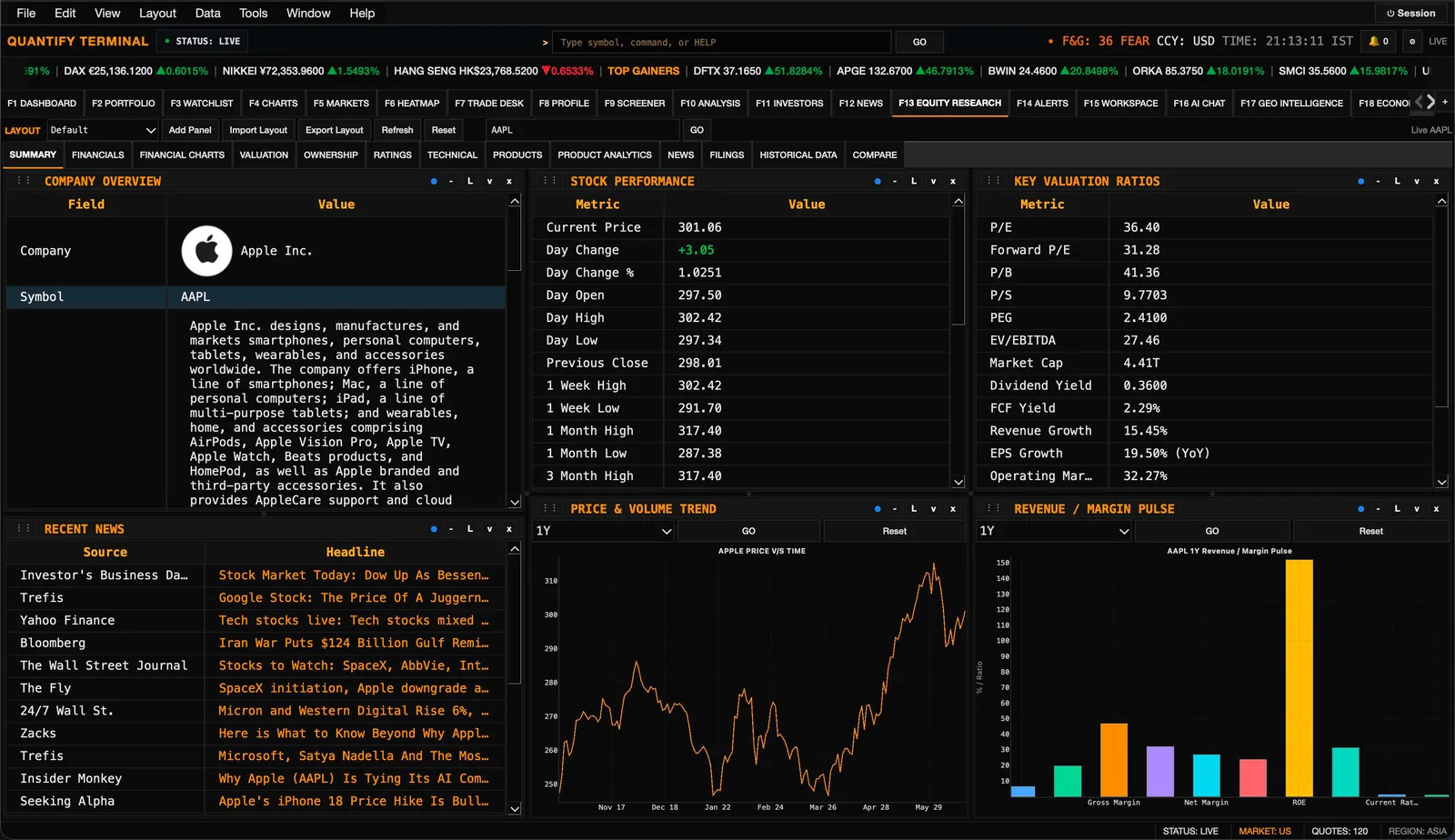
F13A full research workstation for any stock. Equity Research is one of the most powerful areas of the terminal, organised into ten focused views.
Summary
A company overview with performance and key ratios.
Financials
The income statement, balance sheet and cash flow.
Financial Charts
Visual trends for revenue, margins, debt and more.
Valuation
Valuation multiples, history and a discounted-cash-flow model.
Ratings
Analyst recommendations and price-target forecasts.
Technical
Price action, indicators and trading signals.
Ownership
Who owns the stock, the top holders and insider activity.
Product Analytics
A look at the company's product mix and demand.
Historical Data
Full price history with range statistics.
Compare
Line up several companies side by side.


Investors
F11Explore funds and large investors. See how the big players are positioned and what they hold.
- Browse fund overviews, sector allocation and concentration.
- See top holdings and country exposure for any fund.
- Switch to the Portfolios view to study how major investors are positioned.

Investors — fund overview, sector allocation, concentration, top holdings, country exposure, and a Portfolios view.
Charting & trading
Study price action, track what you own, place orders, and automate strategies.
Charts
F4Professional, multi-panel charting. Study price action across several instruments at once, each on its own chart.
- Open multiple charts together, each with its own symbol and timeframe.
- Switch between line, candlestick and other chart styles.
- Add technical indicators to study trends and momentum.
- Compare different instruments side by side on the same screen.

Charts — a multi-chart board with an independent symbol, timeframe, chart type, and indicators on every panel.
Portfolio
Keep track of what you own and how it is doing. The Portfolio tab brings your holdings together and shows your performance at a glance.
- Add your holdings and watch their value update live through the day.
- See total gains and losses, both realized and still open.
- Break performance down by individual asset, by sector and by currency.
- Review your full transaction history in one place.
- Understand your risk and returns with clear, easy-to-read performance metrics.

Portfolio — holdings table, performance chart, transaction history, and per-position detail.
Trade Desk
F7Place and manage trades. The Trade Desk brings your chart, your account and your orders together in one workspace.
- Watch a live chart with your own trade markers on it.
- Review your account summary and available buying power.
- Enter orders quickly with a clear, simple order ticket.
- Track all of your open positions in real time.
- Connect a supported broker to trade live, or practise first in a simulated account.

Trade Desk — a live trading chart with trade markers, account summary, an order ticket, and open positions.
Algo Trading
F23Build and test automated strategies. Algo Trading lets you design a strategy and see how it would have performed.
- Design strategies with a guided builder.
- Backtest them and review the results in detail.
- Watch a live chart, your positions and an activity monitor.

Algo Trading — a strategy builder, a live price chart, open positions, backtest metrics, and an activity monitor.
Quant Studio
F24Advanced quantitative research. Quant Studio is a workshop for more sophisticated, data-driven analysis.
- Browse a library of strategies to start from.
- Build and run backtest models.
- Keep a research notebook and review your analytics.

Quant Studio — a quant summary, a strategy library, a backtest model, a research notebook, and analytics.
Global & macro context
Markets do not move in isolation. Explore the bigger picture with an interactive globe, country economics, live geopolitics, and the relationship and supply-chain webs behind companies.
Geo Intelligence
F17The world on an interactive globe. Geo Intelligence gives global events and conditions a geographic view.
- Spin a 3D globe and add layers of information.
- Track world clocks and local conditions for the places that matter to you.
- See at a glance what is happening around the world.
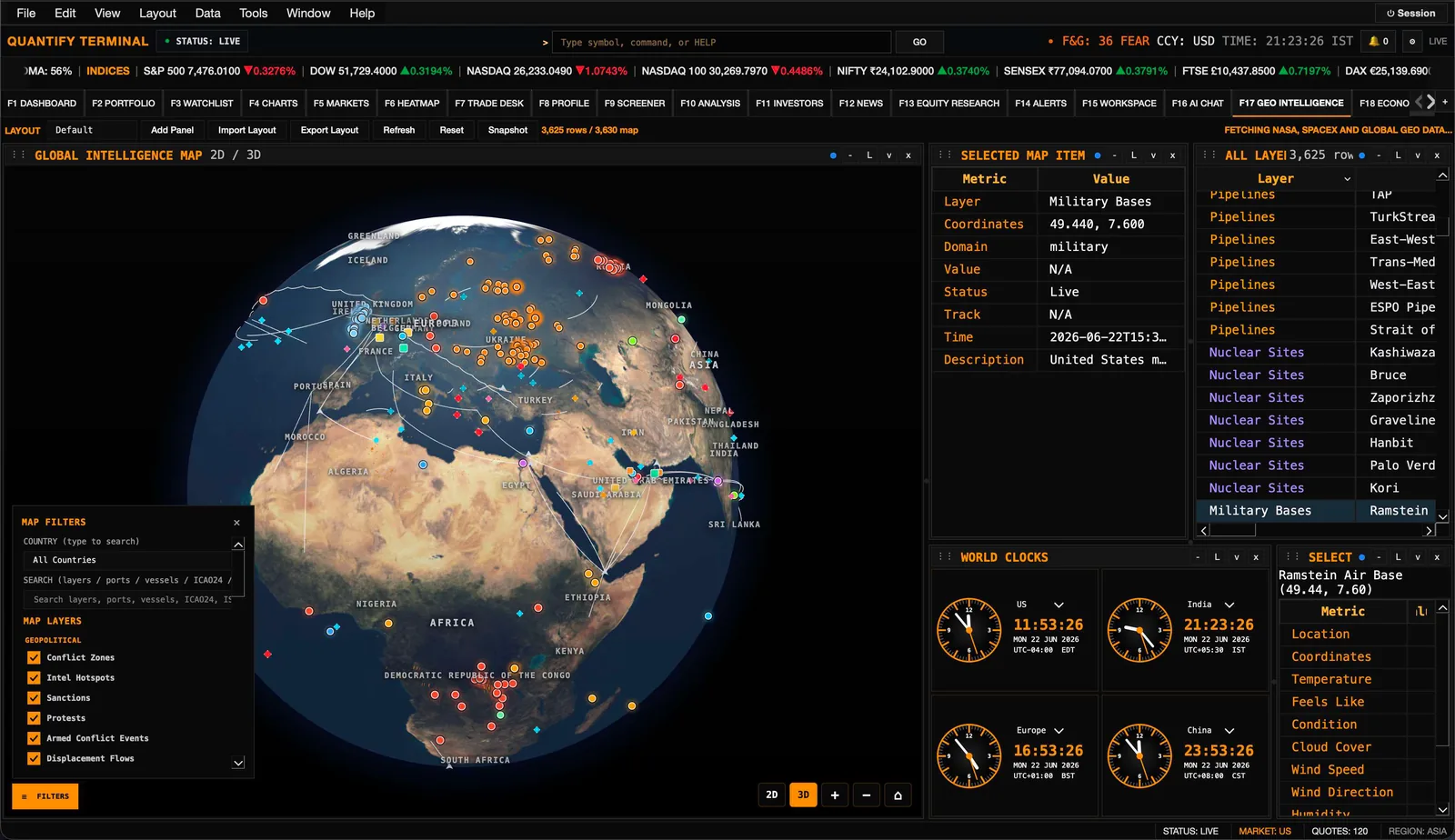
Geo Intelligence — an interactive 3D globe with layered map items, world clocks, and per-location weather.
Economics
F18Country-level economic insight. The Economics tab makes the big-picture economy easy to explore, across eight views.
Country Profile
An economic snapshot at a glance.
GDP & Growth
Output, growth and per-capita trends.
Population
Size, density and demographics.
Trade
Exports, imports and the trade balance.
Government
Debt, spending and revenue.
Environment
Emissions, renewable energy and more.
Inclusion
Inequality and social indicators.
Calendar
Upcoming economic events and releases.


Geopolitics
F19A live map of world events. Geopolitics helps you keep an eye on developments that can shape the markets.
- Follow conflicts, crises and incidents on a global map.
- Open country intelligence and detail for any event.
- Track live developments — including an aircraft-tracking overlay — as they unfold around the world.


Relationship Map
F20See how companies connect. The Relationship Map reveals the web of links between businesses.
- Explore a network graph of company relationships.
- Review clear summaries and supporting tables.
- Understand partners, peers and connections at a glance.

Relationship Map — company info, a relationship network graph, a relationship summary, and relationship tables.
Supply Chain
F21Map the chain behind a company. The Supply Chain tab shows who a company depends on and who depends on it.
- Visualise suppliers and customers on a map.
- Drill into the detail of any single supplier.
- See dependencies clearly in a connected graph.

Supply Chain — a supply-chain map, selected supplier detail, a customers table, and a dependency graph.
Live News & Monitors
F22A live video wall. Keep the news playing beside your markets without switching apps.
- Watch multiple live news channels at once.
- Arrange your own monitor layout to suit you.
- Keep a built-in browser handy right next to the markets.

Live News and Monitors — a multi-channel live video wall with monitors and an embedded browser.
Tools & account
Bring your own thinking together with live data, ask questions in plain language, set alerts, and make the terminal your own.
Workspace
F15Your own research notebook and spreadsheet. The Workspace is where you bring your own thinking together with live market data.
- Keep notes right alongside a built-in spreadsheet.
- Pull live market values straight into your sheets.
- Use a library of ready-made formulas, or build your own.
- Import and export your work whenever you need to.


AI Chat
F16Ask questions in plain language. A built-in assistant sits beside your work to help you research and learn faster.
- Get help understanding companies, markets and unfamiliar terms.
- Ask for summaries and explanations as you research.
- Use it as a knowledgeable companion right inside the terminal.
Alerts
F14Never miss a move. Set the terminal to watch the market for you and let you know when something happens.
- Set price and condition alerts on any symbol.
- Review your active alerts and your full alert history.
- Choose how you would like to be notified.

Alerts — active alerts, alert history, and the create-alert builder with conditions and delivery options.
Account
F25Manage your profile and preferences. The Account tab is where you make the terminal your own.
- Update your details and sign-in settings.
- Choose your theme and display preferences.
- Manage notifications and keep the app up to date.
Tips & shortcuts
A few habits make the terminal noticeably faster to work in day to day.
- Press a function key to jump straight to a tab — no clicking required.
- Type a ticker into the search box from anywhere to load it fast.
- Build separate watchlists for the different themes or sectors you follow.
- Set alerts so the terminal keeps watch and tells you when something moves.
- Use the Workspace to keep your research, notes and numbers in one place.
- Try Equity Research and Compare when you want the deepest view of a company.
Frequently asked questions
Which platforms does it run on?
macOS, Windows and Linux — available from the official website, with a Microsoft Store option on Windows.
Are my watchlists and notes saved?
Yes. Your watchlists, notes and preferences are kept with your account.
How often do prices update?
Prices stream live through the trading day wherever live data is available.
Can I change how it looks?
Yes. You can customize almost anything in the UI — theme, font size, table size, and the position and size of panels and tabs — to build the layout that fits how you work.
Support & downloads
Quantify Terminal is a native desktop application. Choose your operating system and install the latest build to get started, or reach out if you need a hand.